Google Cloud Platform Blog
Google App Engine Tips and Tutorials on Google Developers Live
Tuesday, August 28, 2012
Have you ever wanted to use a new feature of Google App Engine, but were uncertain of how to get started? Documentation and sample applications are a great way to start learning about App Engine, but sometimes a more interactive approach can make all the difference.
Google Developers Live
is exactly that. Each week, members of our Developer Relations Team host a Google+ Hangout or event to discuss a feature or tip. You can get expert answers to your questions, live. In addition to the live session, these talks are recorded and
available on YouTube
for you to view whenever you want.
We’ve hosted sessions on using
Google Cloud SQL
,
Google Cloud Endpoints
, and other Google Cloud Platform services like
Google Compute Engine
. Have a topic you’d like to learn more about? Let us know by filling out this
questionnaire
.
- Posted by the Google App Engine Team
App Engine 1.7.1 Released
Tuesday, August 21, 2012
If there were an Olympic coding event, we have no doubt that the gold medal winner could be found amongst the App Engine developer community. So today we’ve got a new release out so you can hone your skills just in case they are needed in Rio in 2016.
App Admin
Usage Report Download - We’ve added the ability to download the past 90 days of your application’s usage reports as a CSV file.
Namespaces in the Memcache Viewer - The Admin Console
now supports
retrieving memcache values that are stored in a non-default namespace.
Python
Appstats updates - We’ve included a few new things in appstats with 1.7.1. You can now view RPC cost information in appstats. We’ve also added an interactive console which lets you trigger and then examine an RPC call for real-time debugging.
PyCrypto 2.6 support - We’ve included the latest version of PyCrypto as an option for
third party libraries
in Python 2.7.
Java
DataNucleus App Engine Plugin 2.1.0 - We’re excited to announce that with the latest upgrade we’re making V2 of the DataNucleus plugin fully supported. V2 adds support for JPA 2 and JDO 3, and this point release contains a variety of bug fixes. You can see the full list
here
.
Appstats Analytics Trusted Tester
We are looking for early Python and Java Trusted Testers to try a new interactive visualization tool for troubleshooting and tuning application performance. If you are interested in trying out this new tool please
sign up here
.
URLFetch
We’ve updated the way URLFetch handles multiple headers in response to one of our
public issues
. When a response contains the same header multiple times, these values will now be returned as a list.
Conversion API Decommission
We are
decommissioning
the experimental
Conversion API
as of our November release. Please begin exploring alternative document conversion mechanisms.
The complete list of features and bug fixes for 1.7.1 can be found in our release notes (
Java
,
Go
,
Python
). For App Engine coding questions and answers check us out on Stack Overflow, and for general discussion and feedback, find us on our Google Group.
Attention App Engine experts: Interested in helping new businesses and enterprise customers be successful with Google Cloud Platform? Check out our job posting for
Solution Architects
.
We are also hiring
technical writers
in Mountain View and San Francisco
to document cool new App Engine features and engage with the community to broaden the impact of Google's cloud offerings.
Neural Network for Breast Cancer Data Built on Google App Engine
Tuesday, August 7, 2012
Today’s guest blog post comes from 17-year-old
Brittany Wenger, the winner of this year’s
Google Science Fair
. Brittany built an application on Google App Engine called the "
Global Neural Network Cloud Service for Breast Cancer." This artificial neural network can detect complex patterns in data, learning how to classify malignant or cancerous cells it hasn’t seen before.
Learn more about her project
.
When a patient has a palpable breast lump, the first step a doctor takes is to determine whether the mass is malignant or benign. One relatively simple diagnostic procedure is a form of biopsy called fine needle aspiration (FNA). Though these tests are less invasive than others, they are historically less accurate as well. My goal was to create a tool for doctors to use when interpreting test results from these procedures.
For this project, I decided to create a neural network built on Google App Engine, using
data
published to the
Machine Learning Repository
by the University of Wisconsin. A neural network attempts to replicate the brain as a form of artificial intelligence through networks of computers and can be used to detect extremely complex patterns. It learns from its mistakes, so it can classify a case it hasn’t seen before as malignant or cancerous based on specific criteria like clump thickness or bland chromatin. Because the diagnostic power of the network improves the more data it has, building on App Engine is a way to ensure the app can continue to scale easily, no matter how much information goes into the system.
I got started integrating my neural network application code, written in Java, with App Engine in a few hours using the SDK’s Greeting Service sample code as a starting point. The application has two main parts, a training module, that implements the neural network itself and runs the training process over the input data stored in static files, and a web interface that takes input data and returns the network’s analysis.
Google App Engine provides the scalable infrastructure I need to collect information from every hospital in the world and run when there are many concurrent requests, as usage of my application increases. Because my network is built as a cloud service, not only is my app working on the web, but mobile tablets, smartphones, old PC systems, or new technologies can also easily access the service from any hospital with an internet connection.
The neural network I developed is 99.11% sensitive to malignancy when using
leave-one-out testing
with original data.
Thus far, I have run 7.6 million trials. Moving forward my goal is to make the application accessible to the global medical community so more data can be deposited and used to improve the diagnostic power of the network.
Announcing Google App Engine education awards
Monday, July 30, 2012
In addition to the startups and businesses we frequently highlight on our blog, we have seen educational institutions and their students build amazing applications, using Google App Engine as a platform for teaching and groundbreaking research.
Earlier this year we
announced
funding for researchers looking to use App Engine for scientific discovery. Today we are introducing the Google App Engine Education Awards to foster continued innovation from educational institutions in areas outside of research. Through this program we are inviting faculty members, initially from the United States, to submit proposals for using App Engine for their course development, educational research, university tools or for student projects. A selection of the proposals we receive will receive $1,000 in App Engine credits to assist in making the proposal a reality.
App Engine allows you to build scalable applications using the same technology that powers Google’s global-scale web applications. With no hardware to setup, App Engine makes it simple to learn how to write a simple web application or to build an application that handles millions of hits a day. If you haven’t already tried App Engine, we encourage you to
download the SDK
, follow the
Getting Started Guide
and take advantage of our free tier to deploy your first application.
If you teach at an accredited college, university or community college in the United States, we encourage you to apply. You can submit a proposal by filling out
this form
. Applications must be received by midnight PST August 31, 2012.
- Posted by the Google App Engine Team
Analyzing your Google App Engine Logs with Google BigQuery
Monday, July 23, 2012
Developers know that logging and logs analysis can often mean the difference between delighting and disappointing users. With the Google App Engine
LogService API
, it’s easy to add logging to your App Engine App with just a few lines of code. But of course, logging events is only the beginning, and today we’re particularly excited to highlight using
Google BigQuery
to analyze your App Engine logs.
Google BigQuery is an externalized version of Google’s own logs analysis framework that allows developers to run queries across billions of rows of data in seconds via a RESTful API. BigQuery uses a familiar SQL-like query language and is able to scale to datasets that are terabytes in size and beyond.
We see BigQuery as a natural fit for logs analysis, and at I/O this year, our developer relations team led a
codelab
demonstrating how to import and analyze App Engine logs with BigQuery.
Our customers have also had success with this technique, and App Engine developers at
Streak.com
posted their own
walkthrough
and
Java framework
, called Mache, for automatically exporting App Engine logs into BigQuery. Mache provides a simple interface for scheduling cron jobs that parse and ingest log file data into BigQuery at user-defined intervals.
If you’re interested in trying out Google BigQuery with App Engine, check out the
getting started guide
and the
sample code
from our I/O codelab. Happy logging!
- Posted by the Google App Engine Team
Also, if you’re interested in analyzing Datastore data in BigQuery, check out our
article
that shows how to use App Engine MapReduce to manage the transformation and export of Datastore entities.
Develop in the cloud with eXo’s Cloud IDE
Tuesday, July 17, 2012
Today’s post comes from Mark Downey of eXo, creator of Cloud IDE. Cloud IDE is an online IDE for Java, Python, PHP, Ruby or Javascript, and for nearly two years it has been used by developers to build applications for a number of PaaS environments. They recently added support for deploying code to Google App Engine.
Since eXo started the
Cloud IDE project
back in 2010, our objective has been to make developers more productive in building and deploying cloud-based apps. We’ve made it easy to import, build and debug code from
Github
and to deploy it to a PaaS. We have tried to make the development workflow as painless as possible by providing a smooth integration with popular Cloud services from source control to application hosting, and now we’re bringing that integration to the Google App Engine world.
Developers can now use Cloud IDE to build, debug and deploy App Engine apps without having to install and configure the App Engine SDK or any traditional desktop IDE. Everything happens right in the browser.
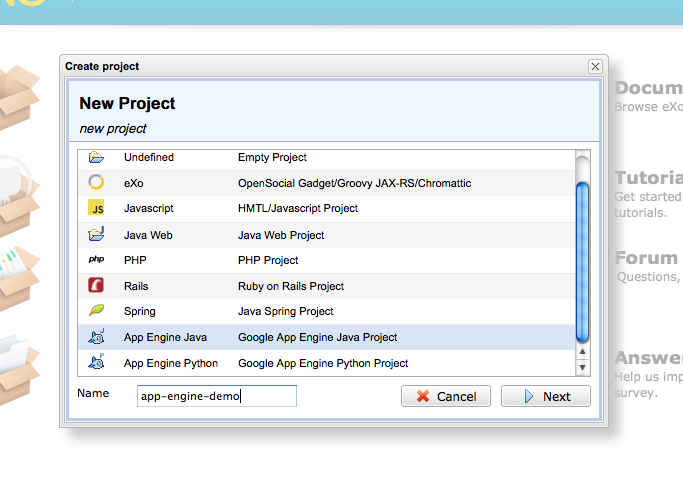
It’s easy to get started. Once you have a
Cloud IDE account,
start a new project and select a Google App Engine app (Java or Python) as the project type. Confirm that you want to deploy to Google App Engine, and you will then be asked to create an app with your App Engine account.
This opens the App Engine admin console in a new browser tab, where you get to choose your app ID (which will define the URL of your application). Upon completion, a callback in the URL automatically updates your appengine-web.xml with your app ID, inside Cloud IDE.
That’s it! From there, just click
deploy
and enter your credentials to build and deploy your app on Google App Engine.
In Java, you can use auto-completion (
alt+space
) and have access to all the Google App Engine libraries. Many keyboard shortcuts are also available to help you develop efficiently (
Help > Show Keyboard Shortcuts
).
To run and debug your app on a development server, press
Debug
in the
Run
menu, and set your breakpoints. Your app will run in another browser tab and you’ll be able to inspect variables at runtime.
To re-deploy, just go to the App Engine menu in
Project >
PaaS
>
Google App Engine
, and click
Update Application
.
The Google App Engine menu also enables you to view and update your App Engine services such as Indexes, PageSpeed, Queues, DoS, Resource Limits, Crons or Backends.
With eXo Cloud IDE, you can run, debug and deploy App Engine apps without having to install and configure the App Engine SDK or the Google Plugin for Eclipse (or, for that matter, Eclipse itself). Because everything related to your development activities is taking place on the Cloud IDE servers, your initial setup time is dramatically reduced. In a couple minutes you can be focusing on the things that matter most: coding and refining the app itself.
- Contributed by Mark Downey, product manager for eXo Cloud Services
@marksdowney
Another great year for App Engine at Google I/O
Tuesday, July 3, 2012
App Engine engineers talk to developers in the cloud platform sandbox at Google I/O
The dust has settled on another fantastic Google I/O. The skydiving demos and delicious jelly beans were great, but we had the most fun talking to developers and hearing about their experiences using Google’s technology. Here are the highlights of the App Engine talks from this year.
In our
overview session
, Peter Magnusson and Greg D’Alesandre introduced many of our new features and announced that we have attained 7.5 billion hits per day and are running more than 1 million active applications.
We announced
Google Compute Engine
and Alon Levi and Adam Eijdenberg showed how to
use App Engine to orchestrate compute instances
.
Cloud SQL began taking open signups and we witnessed an epic battle of the backends in our
SQL vs NoSQL
session, with
Alfred Fuller
representing the Datastore and
Ken Ashcraft
representing Cloud SQL.
We announced
Google Cloud Endpoints
and hosted a codelab to give developers early access to our trusted tester program.
Brian Quinlan covered the finer points of the
Python 2.7 runtime
.
And last but not least, Marzia Niccolai,
Greg Darke
and Troy Trimble gave some great tips for
optimizing App Engine applications
.
We’ll be taking a short break from our regularly scheduled release cycle in July, but we’ll get back on our usual drumbeat of monthly releases in August.
- Posted by the Google App Engine Team
Don't Miss Next '17
Use promo code NEXT1720 to save $300 off general admission
REGISTER NOW
Free Trial
GCP Blogs
Big Data & Machine Learning
Kubernetes
GCP Japan Blog
Labels
Announcements
56
Big Data & Machine Learning
91
Compute
156
Containers & Kubernetes
36
CRE
7
Customers
90
Developer Tools & Insights
80
Events
34
Infrastructure
24
Management Tools
39
Networking
18
Open Source
105
Partners
63
Pricing
24
Security & Identity
23
Solutions
16
Stackdriver
19
Storage & Databases
111
Weekly Roundups
16
Archive
2017
Feb
Jan
2016
Dec
Nov
Oct
Sep
Aug
Jul
Jun
May
Apr
Mar
Feb
Jan
2015
Dec
Nov
Oct
Sep
Aug
Jul
Jun
May
Apr
Mar
Feb
Jan
2014
Dec
Nov
Oct
Sep
Aug
Jul
Jun
May
Apr
Mar
Feb
Jan
2013
Dec
Nov
Oct
Sep
Aug
Jul
Jun
May
Apr
Mar
Feb
Jan
2012
Dec
Nov
Oct
Sep
Aug
Jul
Jun
May
Apr
Mar
Feb
Jan
2011
Dec
Nov
Oct
Sep
Aug
Jul
Jun
May
Apr
Mar
Feb
Jan
2010
Dec
Oct
Sep
Aug
Jul
Jun
May
Apr
Mar
Feb
Jan
2009
Dec
Nov
Oct
Sep
Aug
Jul
Jun
May
Apr
Mar
Feb
Jan
2008
Dec
Nov
Oct
Sep
Aug
Jul
Jun
May
Apr
Feed
Subscribe by email
Technical questions? Check us out on
Stack Overflow
.
Subscribe to
our monthly newsletter
.
Google
on
Follow @googlecloud
Follow
Follow







 Follow