Just in time for spring, we have a new App Engine release to bring our Java and Python runtimes even closer to parity. For Python, we’ve launched a test library to match the existing Java testing framework, and for Java we’ve introduced the Deferred and Remote APIs. This release also introduces a new Blobstore writing feature, the experimental release of the Prospective Search API in Python, and a few goodies for Task Queue and Cron users.
Finally, we have a pre-announcement about the 1.4.4 release. In 1.4.0, we introduced a feature that allowed users to download code that they’ve deployed to App Engine. In 1.4.2 we released admin roles allowing for Owners. When 1.4.4 is released, we plan on including a change that allows both the person who uploaded the code to download it, as well as the Owner(s) of the project (as listed in the Admin Console). In preparation for this, be sure to properly assign roles to all developers on your App Engine application in the Admin Console. Alternatively, you will still be able to permanently disable the code download feature for your application.
That’s it for now, for additional information read the full release notes, including all new features and issues fixed for Java and Python. All feedback is welcome and encouraged in our groups.
SpotCloud.com
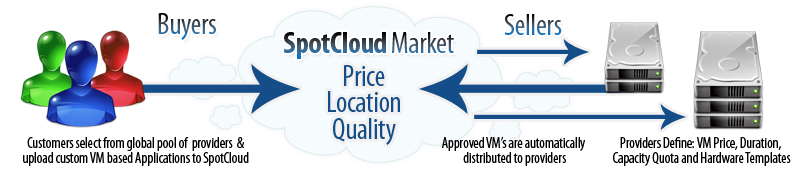
SpotCloud is the first marketplace where service providers can sell their unutilized or under-utilized IaaS cloud services, and where buyers can shop competitively for these services on the basis of quality, price, and geography across a federated global pool of capacity with a single, consistent set of access and management mechanisms.
SpotCloud provides its users with the following main services:
Why Google App Engine?We realized early on that a traditional data center infrastructure -- even one built on our own ECP technology -- was not a fit for a platform which needs to be global from day one. We also had a strong preference for Python, given that large parts of our existing IaaS software stack is built using it. Cost was also very important: SpotCloud needs to manage potentially very large Virtual Machines, delivering them to a globally distributed group of providers and managing them in near-real time across this extended footprint. With Google App Engine we have the power, flexibility, and global breadth of the Google infrastructure at our disposal. This was a key selling feature for us. Also the cost was practically impossible to beat.
How App Engine powers SpotCloudAs you can see from the list of services provided by SpotCloud, most of our application actually runs in the background. This is made possible by App Engine task queues and cron jobs. We need to poll for stage changes across hundreds (soon thousands) of service providers -- we need a near-real-time view of instance states, available virtual hardware profiles, cloud utilization data, etc. These things are triggered by cron schedules. Each of these tasks goes into a queue. We're able to execute these tasks to allow us to keep our view of service provider resources up to date without interrupting the front-end UI and API workflows.
Another challenge is executing tasks at a particular point in the future. Running instances deployed out to a provider through SpotCloud may expire, and renewal may or may not be allowed depending on the seller’s settings. So we need a way to terminate them if their time is up. We can use the task queue API to execute this in the future. We're able to ensure our data is consistent by adding tasks to the queue in a transactional way.
Buyers upload the appliances they want to provision to the market. So we obviously have a big storage requirement. App Engine’s data store allows us to do this in a highly performant, cost-effective manner. SpotCloud can then distribute these appliances out to providers on demand. We're able to do this because of the low-cost bandwidth Google provides.
We're big fans of Django at Enomaly, and we use it in SpotCloud. We've been able to loosely couple Django with the App Engine data store, along with other App Engine components and services like urlfetch. This means that we're not "locked-in" with App Engine. The App Engine API is structured in such a way that we're able to extend any web framework we want with App Engine components that help us scale.
SpotCloud SuccessSince announcing the SpotCloud private beta at the end of last year, we’ve been overwhelmed by the amount of interest we’ve gathered, and have had large numbers of service providers from all over the globe join our beta. We now have more than 10,000 servers from 40+ countries represented in the marketplace.
Since we opened the marketplace to buyers and sellers early in 2011, the market has been off to a roaring start -- as noted by The Economist, ComputerWorld, and many others. Google App Engine has performed up to our (high!) expectations, serving an ever-increasing transaction rate in the market without a hiccup. We’re looking forward, as the market ramps up even further, to seeing if we can make App Engine break a sweat! Sign up today as a cloud capacity buyer or seller at www.spotcloud.com.
[Cross-posted from the Europe Developer Blog]
As you may have heard, the UK is gearing up for a very special wedding on April 29, when Prince William and Catherine Middleton will be married in Westminster Abbey in London.
Unlike many previous Royal Weddings, this event will have its own website – and we're honoured that St. James’s Palace has chosen to use Google’s computing infrastructure to power the site.
The site, which just went live at www.officialroyalwedding2011.org, is hosted on Google App Engine, which allows developers easily to build and host their web applications on Google's own computing infrastructure. It's a great way to run apps quickly, more securely, and at scale, which makes it ideal for such an important national occasion. The site will be regularly updated by St. James’s Palace in the run up to the wedding day.
This was a great team effort between Accenture, who built the site, the web design agency Reading Room who led on the design and creative work, and the App Engine team.
We hope it proves to be the perfect marriage of tradition and modernity as we approach the big day.
If you've been watching Best Buy closely, you already know that Best Buy is constantly trying to come up with new and creative ways to use App Engine to engage with their customers. In this guest blog post, Luke Francl, BBYOpen Developer, was kind enough to share with us Best Buy's latest App Engine project.
As part of Best Buy's Connected Store initiative, we have placed QR codes on our product information Fact Tags, in addition to the standard pricing and product descriptions already printed there. When a customer uses the Best Buy app, or any other QR code scanner, they are shown the product details for the product they have scanned, powered by the BBYOpen API or the m.bestbuy.com platform.
To track what stores and products are most popular, QR codes are also encoded with the store number. My project at Best Buy has been to analyze these scans and make new landing pages for QR codes easier to create.
Since we have the geo-location of the stores and product details from our API, it is a natural fit to display these scans on a map. We implemented an initial version of this idea, which used polling to visualize recent scans. To take our this a step further, we thought it would be exciting to use the recently launched App Engine Channel API to update our map in real-time.
<br />
Our biggest challenge was pushing the updates to multiple browsers, since we'd most certainly have more than one user at a time looking at our map. The Channel API does not currently support broadcasting a single update to many connected clients. In order to broadcast updates to multiple users, our solution was to keep a list of client IDs and send an update message to each of them.
To implement this, we decided to store the list of active channels in memcache. This solution is not ideal as there are race conditions when we modify the list of client IDs. However, it works well for our demo.
Here’s how we got it working. The code has been slightly simplified for clarity, including removing the rate limiting that we do. To play with a working demo, check out the channel-map-demo project from GitHub.
As customers in our stores scan QR codes, those scans are recorded by enqueuing a deferred. We defer all writes so we can return a response to the client as quickly as possible.
deferred
In the deferred, we call a function to push the message to all the active channels (see full source).
def push_to_channels(scan):
    content = '<div class="infowindowcontent">(...) </div>' % {
                  'product_name': scan.product.name,
                  'timestamp' : scan.timestamp.strftime('%I:%M %p'),
                  'store_name': scan.store.name,
                  'state': scan.store.state,
                  'image': scan.product.image }

    message = {'lat': scan.store.lat,
               'lon': scan.store.lon,
               'content': content}

    channels = simplejson.loads(memcache.get('channels') or '{}')

    for channel_id in channels.iterkeys():
        encoded_message = simplejson.dumps(message)

        channel.send_message(channel_id, encoded_message)
The message is a JSON data structure containing the latitude and longitude of the store where the scan occurred, plus a snippet of HTML to display in an InfoWindow on the map. The product information (such as name and thumbnail image) comes from our BBYOpen Products API.
InfoWindow
Then, when a user opens up the site and requests the map page, we create a channel, add it to the serialized channels Python dictionary, stored in memcache, and pass the token back to the client (see full source).
channels
channel_id = uuid.uuid4().hextoken = channel.create_channel(channel_id)channels = simplejson.loads(memcache.get('channels') or '{}') channels[channel_id] = str(datetime.now())memcache.set('channels', simplejson.dumps(channels))
On the map page, JavaScript creates a Google Maps map and uses the token to open a channel. When the onMessage callback is called by the Channel API, a new InfoWindow is displayed on the map using the HTML content and latitude and longitude in the message (see full source).
onMessage
function onMessage(message) { var scan = JSON.parse(message.data); var infoWindow = new google.maps.InfoWindow( {content: scan.content, disableAutoPan: true, position: new google.maps.LatLng(scan.lat, scan.lon)}); infoWindow.open(map); setTimeout(function() { infoWindow.close(); }, 10000);};
Finally, since channels can only be open for two hours, we have a cron job that runs once an hour to remove old channels. Before deleting the client ID, a message is sent on the channel which triggers code in the JavaScript onMessage function to reload the page, thus giving it a new channel and client ID (see full source).
You can see the end result on our map, watch a video about the BBYScan project or checkout the sample channel-map-demo project and create your own Channel API based application.
It’s only February and we’re already at our second release for the year! Today’s SDK release, 1.4.2 focuses on improving and updating a few existing App Engine APIs.
Improved XMPP API to help applications better interact with users. Notifications are sent when users sign in and out and when their status changes, and the application can now set presence details to be returned to the user. Subscription and Presence notifications are enabled as inbound services in the application configuration.
Task Queue performance and Task Queue API improvements. First, we’ve increased the maximum rate at which tasks can be processed to 100 tasks/second. Applications can also specify the maximum number of concurrent requests allowed per queue in their queue’s configuration file. This can help you more easily manage how many resources your task queue is consuming. We’ve also added an API that allows you to programmatically delete tasks, instead of managing this manually from the Admin Console.
As always, there are more features and issue fixes such as support for JAX-WS complete with a new article on how to build SOAP enabled App Engine apps, as well as support for Django 1.2, so be sure to read the release notes for Java and Python. We’ve also updated the App Engine Roadmap with a few new projects so take a look. And if you have any feedback, please visit the App Engine Groups.
Posted by the App Engine Team
Use promo code NEXT1720 to save $300 off general admission






 Follow